
For one course
Live class
The live class, set up for your course.
- Sign-in with your institution’s Google accounts
- Your course name and class sections
- Your questions for each week, loaded with you
- Records you download after every class
For teachers · Live class
Teach from your screen and voice. Students answer timed questions on their phones, and quietly tell you when they’re lost.
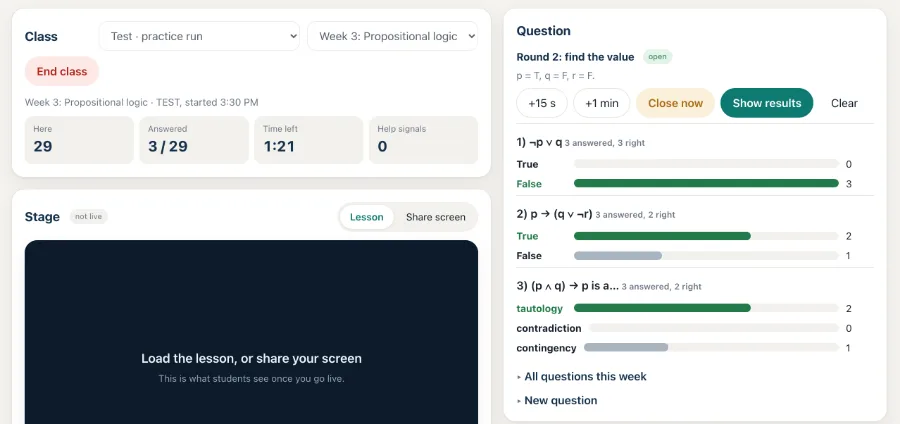
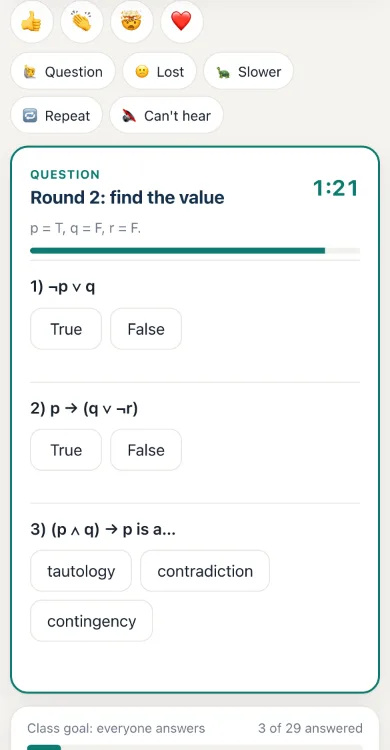
Your screen, its sound, your mic and camera, sent live to every student.
True or false, one choice, several choices or a short typed answer, prepared for each week or written on the spot. The server keeps the timer, so it’s the same on every phone.
How many answered and how many are right, part by part, while the question is open.
A class chat that pauses while a question is open, private questions to you, and mute for one student.
Students see their answers from recent classes, and the right answers once the week’s classes are over.
Who joined, when and for how long. Download every class as a spreadsheet (CSV) or JSON when it ends.
Class records leave the server 7 days after each class, accounts go at the end of term, and a student can delete theirs at any time. The full notice.
Students only watch and tap: their camera and mic stay off, and the class is not recorded.
Every class is different, so there is no price list. Tell us how you teach, and we’ll reply with how it would work for you.
For one course
The live class, set up for your course.
For one course, with lessons
Everything in Live class, plus recorded lessons your students can watch again.
For a department
Several courses and teachers, set up together.
No. It runs in the browser on a phone, tablet or laptop.
Google accounts. Addresses from your institution join as students; any other account can only watch until you let it in.
No. Your screen and voice are streamed live and not recorded. Students send no video or sound.
Yes. Each week’s questions are prepared with you, and you can write a new one during the class.
On our host, Cloudflare. Class records are deleted 7 days after each class, so you download them before then. See the privacy notice.
Bring it to your classroom
Email us your institution, your course and class size, and how you teach now. We’ll reply with how the live class would work for you, what we would set up, and what it costs.
Email info@pearlhx.comWe use these details only to reply to you, and delete them on request (privacy).